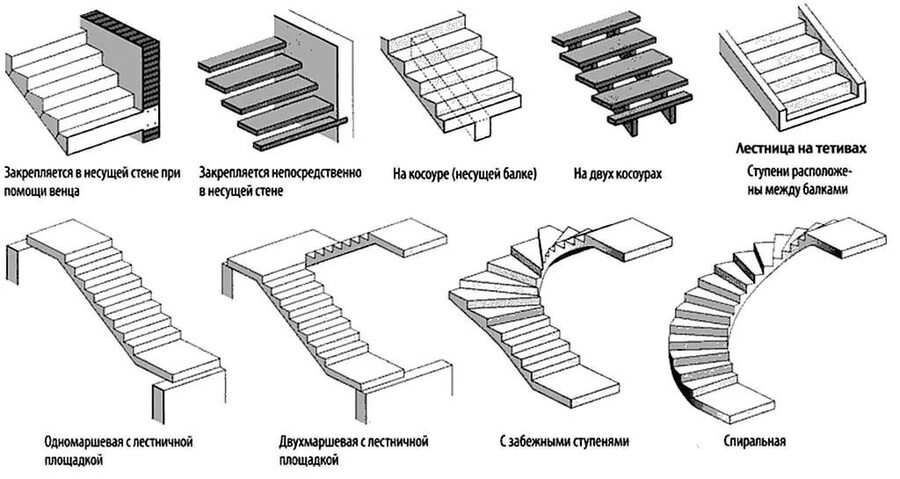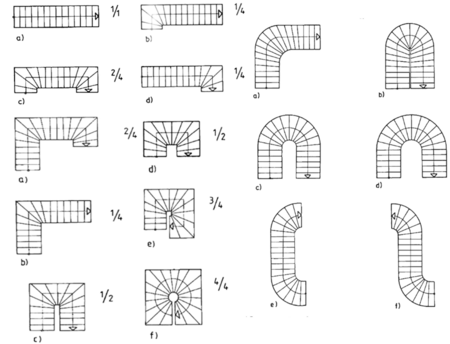
В общем виде лестницы можно классифицировать следующим образом:
— по назначению:
междуэтажные, входные, рабочие, проходные;
— по относительному положению — внутренние и наружные;
— по форме:
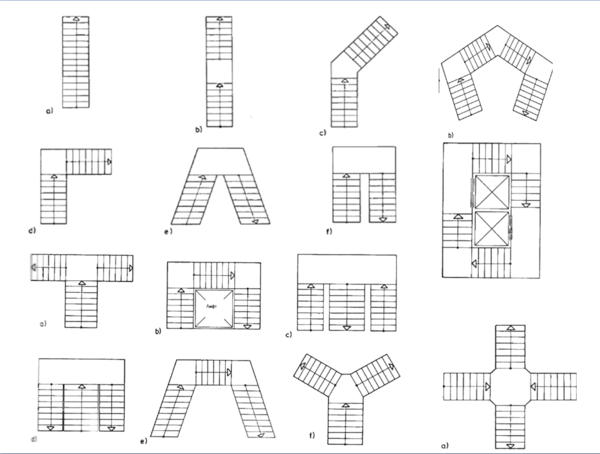
прямые (одномаршевые и многомаршевые),
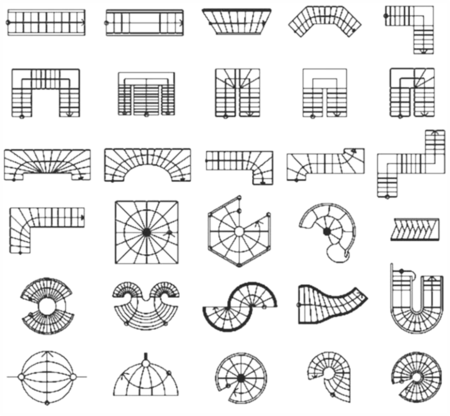
с забежными ступенями,
винтовые
круговые
— по способу функционирования:
стационарные, трансформируемые и переносные;
— по конструкции:
с подступенками, без подступенков,
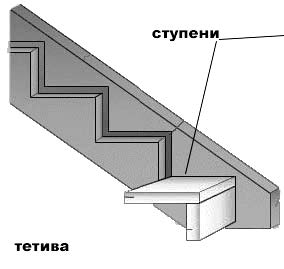
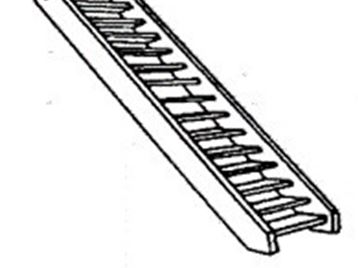
с тетивами или на косоурах,
винтовые (с центральной стойкой или без нее), суппортовые,
со ступенями консольными, подвесными, выдвижными, забежными и т. д.;
— по степени заводской готовности: мелкоэлементные и крупноэлементные, полносборные
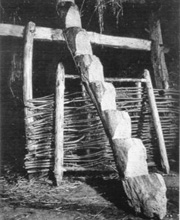
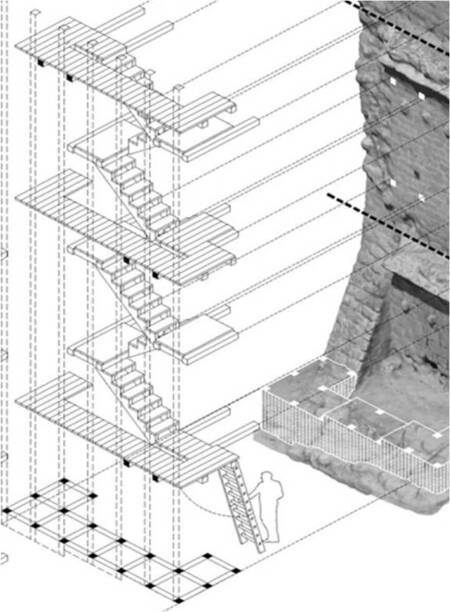
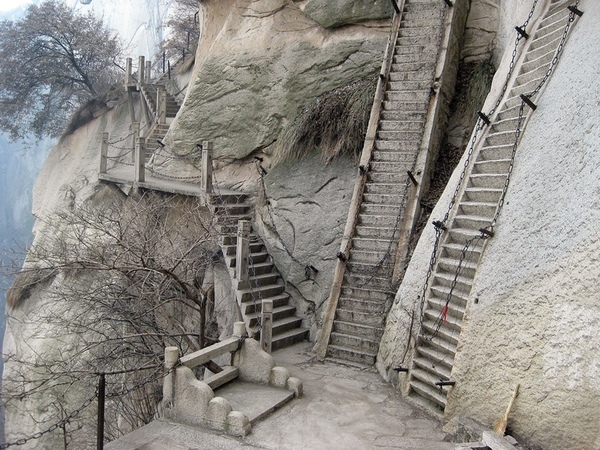
ПРИРОДНЫЕ ОБРАЗОВАНИЯ В ВИДЕ СТУПЕНИЙ

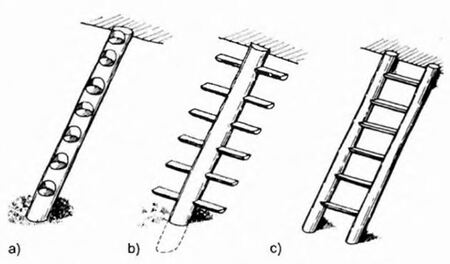
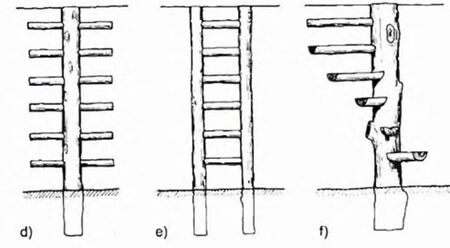
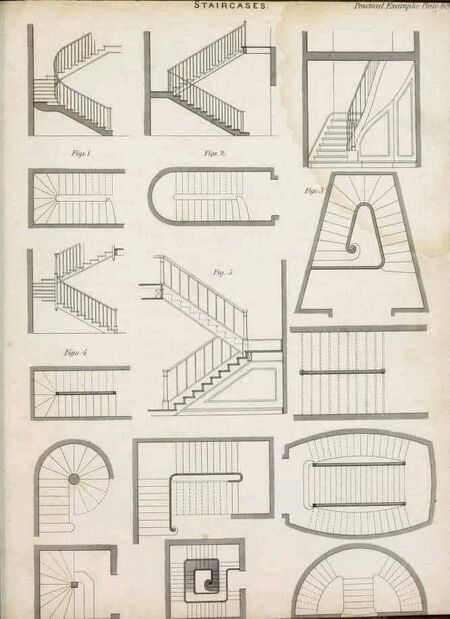
ФОРМИРОВАНИЕ БАЗОВЫХ ТИПОВ ЛЕСТНИЦ
Исходный размер 1024x545
Краткое руководство к строительному искусству и архитектуре (общие начала). Вып. II. Основания и части зданий. Брониш Л., Фишер В. 1914
Исходный размер 3099x2403
ОБЩИЕ ТРЕБОВАНИЯ ПРЕДЪЯВЛЯЕМЫЕ К ПРОЕКТИРОВАНИЮ ЛЕСТНИЦ
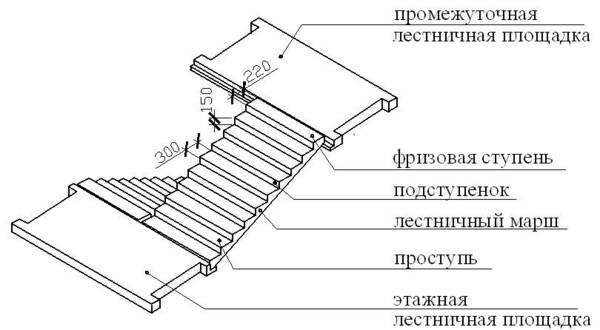
Лестницы должны быть достаточно прочными и огнестойкими, индустриальными, с количеством ступеней в марше не менее 3 и не более 16.
Минимальная ширина лестничных маршей в двухэтажных зданиях — 90 см,
в зданиях выше двух этажей — 105 см.
Максимальная ширина лестничного марша должна быть не более 2,4 м между стеной и перилами или между двумя перилами.
Ширину лестничных площадок принимают не менее ширины марша, а площадок перед входами в лифты с распашными дверями — не менее
1,6 м.
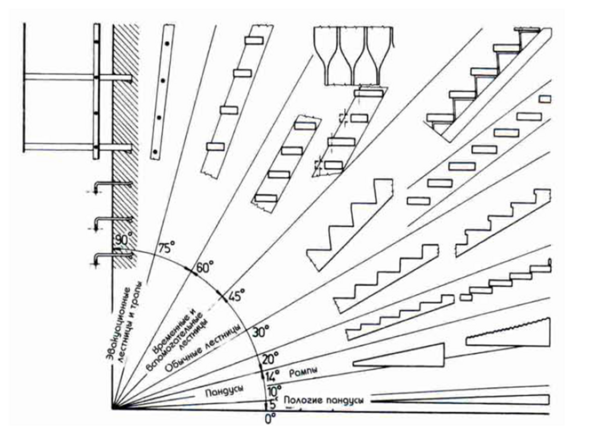
Уклон марша зависит от назначения лестницы и принимается в пределах 1:1,5—1:2.
Ограждение лестниц должно иметь высоту не менее 0,9 м и быть надежно закреплено в несущих конструкциях.
Стены и перекрытия над лестничными клетками, вестибюлями и проходами к наружному выходу в многоэтажных зданиях устраивают из несгораемых материалов.
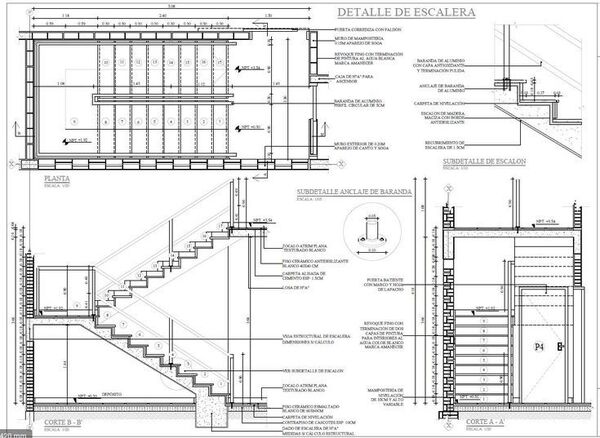
Помещение, в котором размещают лестницы, называют лестничной клеткой. Марш представляет собой конструкцию, состоящую из ступеней и поддерживающих их балок.
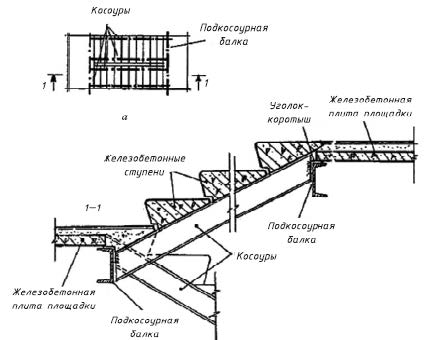
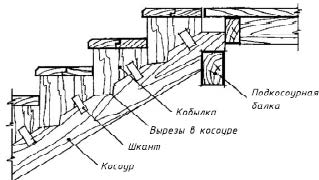
Балки, располагаемые под ступенями, называют косоурами, а балки, к которым ступени примыкают сбоку, — тетивами.
По расположению в здании лестницы могут быть наружными и внутренними, а по назначению — основными, запасными, пожарными, аварийными.
В жилых зданиях высотой более 10 этажей устраивают незадымляемые лестницы. Лестничные клетки таких лестниц сообщаются с наружным воздухом через двери, выходящие на балконы или лоджии.
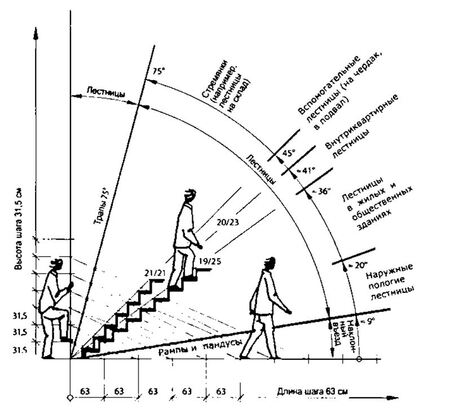
Для удобства пользования лестницей необходимо, чтобы удвоенная высота подступенка h и ширина проступи b в сумме равнялись среднему шагу человека, принимаемому 60 см (b+2h=60см).
Оптимальной считается лестница с шириной проступи 30 см и подступенком высотой
15 см, что определяет уклон марша 1:2 (уклон аварийных лестниц может достигать 45 градусов).
Количество ступеней в одном марше основных лестниц должно быт не менее 3 и не более 18.
Обособленные выходы из подвалов ОЗ
Лестницы, используемые в качестве эвакуационных, не должны иметь входов в подвальные или цокольные этажи, из которых следует устраивать самостоятельные выходы наружу или в 1-й этаж на удалении не менее 5 м от основных эвакуационных путей.
В высотных зданиях лестничные клетки должны быть незадымляемыми. Незадымляемость достигается расположением лестницы у наружной стены с входом в нее через поэтажные балконы или лоджии длиной (по фасаду) не менее 2,5 м или с входами непосредственно из коммуникационных помещений (коридоров), но с обеспечением избыточного давления воздуха (подпора) в лестничной клетке при одной открытой двери. В первом случае лестницы освещаются естественным светом через окна, во втором — могут иметь искусственное и аварийное освещение от специальной сети, независимой от общего освещения.
Незадымляемые лестницы должны иметь выходы непосредственно наружу.
Допускается выход в вестибюль через шлюз с подпором воздуха и с автоматически закрывающимися дверями.
Эвакуационные лестницы рекомендуется располагать в равных, удаленных друг от друга частях здания, что создает возможности рассредоточения людских потоков.
НЕЗАДЫМЛЯЕМЫЕ ЛЕСТНИЧНЫЕ КЛЕТКИ
Незадымляемые лестничные клетки применяются для зданий повышенной этажности и в высотных зданиях. В соответствии со СНиП 21-01-97* классифицируют незадымляемые лестнич-ные клетки 3-х типов:
Н1 — с выходом в лестничную клетку с этажа через воздушную зону;
Н2 — с подпором воздуха в лестничной клетке при пожаре;
Н3 — с поэтажным выходом в лестничную клетку с этажа через тамбур-шлюз с подпором воздуха.
Исходный размер 1183x788
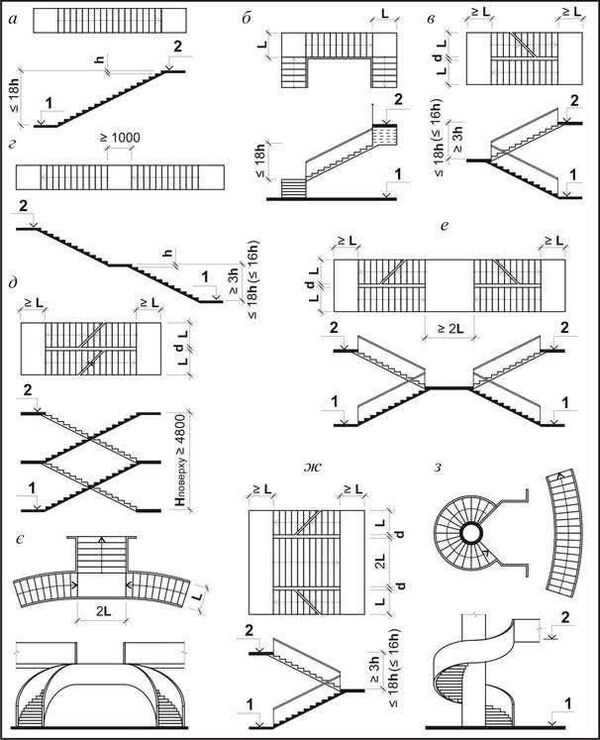
Условное изображение лестниц, пандусов и отмосток
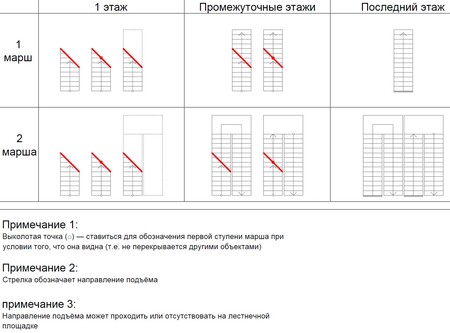
Исходный размер 785x851
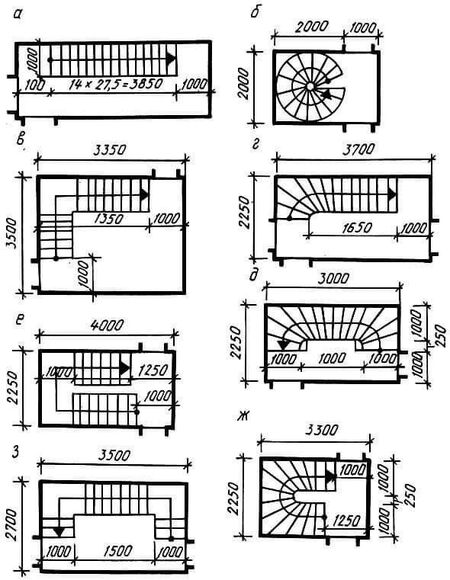
СХЕМЫ ЛЕСТНИЧНЫХ МАРШЕЙ
БАЗОВЫЕ КОНСТРУКТИВНЫЕ РЕШЕНИЯ
I. ЛЕСТНИЦЫ ПО ТИТИВЕ И КОСОУРУ
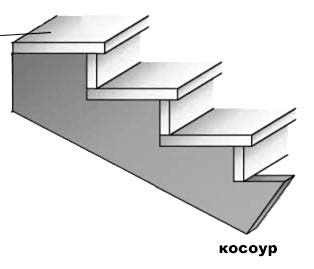
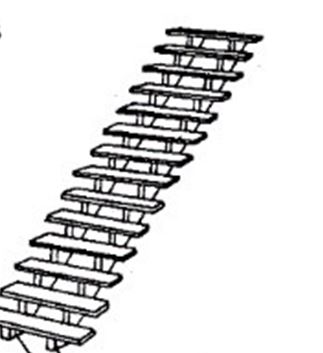
II. ЛЕСТНИЦЫ НА БОЛЬЦАХ
III. СУППОРТОВЫЕ, МОДУЛЬНЫЕ ЛЕСТНИЦЫ
Суппорт (от англ. и франц. support, от позднелат. supporto — поддерживаю) — в строительстве — несущий модульный (сборный) узел косоура лестницы, позволяющий регулировать высоту и угол поворота ступеней.
Суппортовая лестница, модульная лестница — лестница, основными элементами которой являются специальные поворотные элементы — суппорты, соединенные в единый несущий косоур (опорный эллемент лестницы, к которому ступени крепятся сверху). Суппортовые лестницы удобны для установки в ограниченных пространствах и в нестандартных междуэтажных проемах, т. к. позволяют гибко адаптировать высоту, углы подъема и поворотов лестничного марша под фактические габариты помещений.
Суппортовые лестницы часто называют модульными лестницами, т. к. суппортовые узлы и опорные стойки (консоли) подгоняются и собираются по месту установки лестницы из отдельных модулей заводского изготовления.
Мы используем файлы cookies для улучшения работы сайта НИУ ВШЭ и большего удобства его использования. Более подробную...
Показать больше
Press space bar to start a drag.
When dragging you can use the arrow keys to move the item around and escape to cancel.
Some screen readers may require you to be in focus mode or to use your pass through key
Press space bar to start a drag.
When dragging you can use the arrow keys to move the item around and escape to cancel.
Some screen readers may require you to be in focus mode or to use your pass through key
Press space bar to start a drag.
When dragging you can use the arrow keys to move the item around and escape to cancel.
Some screen readers may require you to be in focus mode or to use your pass through key
Press space bar to start a drag.
When dragging you can use the arrow keys to move the item around and escape to cancel.
Some screen readers may require you to be in focus mode or to use your pass through key
Press space bar to start a drag.
When dragging you can use the arrow keys to move the item around and escape to cancel.
Some screen readers may require you to be in focus mode or to use your pass through key
Press space bar to start a drag.
When dragging you can use the arrow keys to move the item around and escape to cancel.
Some screen readers may require you to be in focus mode or to use your pass through key
Press space bar to start a drag.
When dragging you can use the arrow keys to move the item around and escape to cancel.
Some screen readers may require you to be in focus mode or to use your pass through key
Press space bar to start a drag.
When dragging you can use the arrow keys to move the item around and escape to cancel.
Some screen readers may require you to be in focus mode or to use your pass through key
Press space bar to start a drag.
When dragging you can use the arrow keys to move the item around and escape to cancel.
Some screen readers may require you to be in focus mode or to use your pass through key
Press space bar to start a drag.
When dragging you can use the arrow keys to move the item around and escape to cancel.
Some screen readers may require you to be in focus mode or to use your pass through key
Press space bar to start a drag.
When dragging you can use the arrow keys to move the item around and escape to cancel.
Some screen readers may require you to be in focus mode or to use your pass through key
Press space bar to start a drag.
When dragging you can use the arrow keys to move the item around and escape to cancel.
Some screen readers may require you to be in focus mode or to use your pass through key
Press space bar to start a drag.
When dragging you can use the arrow keys to move the item around and escape to cancel.
Some screen readers may require you to be in focus mode or to use your pass through key
Press space bar to start a drag.
When dragging you can use the arrow keys to move the item around and escape to cancel.
Some screen readers may require you to be in focus mode or to use your pass through key
Press space bar to start a drag.
When dragging you can use the arrow keys to move the item around and escape to cancel.
Some screen readers may require you to be in focus mode or to use your pass through key
Press space bar to start a drag.
When dragging you can use the arrow keys to move the item around and escape to cancel.
Some screen readers may require you to be in focus mode or to use your pass through key
Press space bar to start a drag.
When dragging you can use the arrow keys to move the item around and escape to cancel.
Some screen readers may require you to be in focus mode or to use your pass through key
Press space bar to start a drag.
When dragging you can use the arrow keys to move the item around and escape to cancel.
Some screen readers may require you to be in focus mode or to use your pass through key
Press space bar to start a drag.
When dragging you can use the arrow keys to move the item around and escape to cancel.
Some screen readers may require you to be in focus mode or to use your pass through key
Press space bar to start a drag.
When dragging you can use the arrow keys to move the item around and escape to cancel.
Some screen readers may require you to be in focus mode or to use your pass through key
Press space bar to start a drag.
When dragging you can use the arrow keys to move the item around and escape to cancel.
Some screen readers may require you to be in focus mode or to use your pass through key
Press space bar to start a drag.
When dragging you can use the arrow keys to move the item around and escape to cancel.
Some screen readers may require you to be in focus mode or to use your pass through key
Press space bar to start a drag.
When dragging you can use the arrow keys to move the item around and escape to cancel.
Some screen readers may require you to be in focus mode or to use your pass through key
Press space bar to start a drag.
When dragging you can use the arrow keys to move the item around and escape to cancel.
Some screen readers may require you to be in focus mode or to use your pass through key
Press space bar to start a drag.
When dragging you can use the arrow keys to move the item around and escape to cancel.
Some screen readers may require you to be in focus mode or to use your pass through key
Press space bar to start a drag.
When dragging you can use the arrow keys to move the item around and escape to cancel.
Some screen readers may require you to be in focus mode or to use your pass through key
Press space bar to start a drag.
When dragging you can use the arrow keys to move the item around and escape to cancel.
Some screen readers may require you to be in focus mode or to use your pass through key
Press space bar to start a drag.
When dragging you can use the arrow keys to move the item around and escape to cancel.
Some screen readers may require you to be in focus mode or to use your pass through key
Press space bar to start a drag.
When dragging you can use the arrow keys to move the item around and escape to cancel.
Some screen readers may require you to be in focus mode or to use your pass through key
Press space bar to start a drag.
When dragging you can use the arrow keys to move the item around and escape to cancel.
Some screen readers may require you to be in focus mode or to use your pass through key
Press space bar to start a drag.
When dragging you can use the arrow keys to move the item around and escape to cancel.
Some screen readers may require you to be in focus mode or to use your pass through key
Press space bar to start a drag.
When dragging you can use the arrow keys to move the item around and escape to cancel.
Some screen readers may require you to be in focus mode or to use your pass through key
Press space bar to start a drag.
When dragging you can use the arrow keys to move the item around and escape to cancel.
Some screen readers may require you to be in focus mode or to use your pass through key
Press space bar to start a drag.
When dragging you can use the arrow keys to move the item around and escape to cancel.
Some screen readers may require you to be in focus mode or to use your pass through key
Press space bar to start a drag.
When dragging you can use the arrow keys to move the item around and escape to cancel.
Some screen readers may require you to be in focus mode or to use your pass through key
Press space bar to start a drag.
When dragging you can use the arrow keys to move the item around and escape to cancel.
Some screen readers may require you to be in focus mode or to use your pass through key
Press space bar to start a drag.
When dragging you can use the arrow keys to move the item around and escape to cancel.
Some screen readers may require you to be in focus mode or to use your pass through key
Press space bar to start a drag.
When dragging you can use the arrow keys to move the item around and escape to cancel.
Some screen readers may require you to be in focus mode or to use your pass through key
Press space bar to start a drag.
When dragging you can use the arrow keys to move the item around and escape to cancel.
Some screen readers may require you to be in focus mode or to use your pass through key
Press space bar to start a drag.
When dragging you can use the arrow keys to move the item around and escape to cancel.
Some screen readers may require you to be in focus mode or to use your pass through key
Press space bar to start a drag.
When dragging you can use the arrow keys to move the item around and escape to cancel.
Some screen readers may require you to be in focus mode or to use your pass through key
Press space bar to start a drag.
When dragging you can use the arrow keys to move the item around and escape to cancel.
Some screen readers may require you to be in focus mode or to use your pass through key
Press space bar to start a drag.
When dragging you can use the arrow keys to move the item around and escape to cancel.
Some screen readers may require you to be in focus mode or to use your pass through key
Press space bar to start a drag.
When dragging you can use the arrow keys to move the item around and escape to cancel.
Some screen readers may require you to be in focus mode or to use your pass through key
Press space bar to start a drag.
When dragging you can use the arrow keys to move the item around and escape to cancel.
Some screen readers may require you to be in focus mode or to use your pass through key
Press space bar to start a drag.
When dragging you can use the arrow keys to move the item around and escape to cancel.
Some screen readers may require you to be in focus mode or to use your pass through key
Press space bar to start a drag.
When dragging you can use the arrow keys to move the item around and escape to cancel.
Some screen readers may require you to be in focus mode or to use your pass through key
Press space bar to start a drag.
When dragging you can use the arrow keys to move the item around and escape to cancel.
Some screen readers may require you to be in focus mode or to use your pass through key
Press space bar to start a drag.
When dragging you can use the arrow keys to move the item around and escape to cancel.
Some screen readers may require you to be in focus mode or to use your pass through key
Press space bar to start a drag.
When dragging you can use the arrow keys to move the item around and escape to cancel.
Some screen readers may require you to be in focus mode or to use your pass through key
Press space bar to start a drag.
When dragging you can use the arrow keys to move the item around and escape to cancel.
Some screen readers may require you to be in focus mode or to use your pass through key
Press space bar to start a drag.
When dragging you can use the arrow keys to move the item around and escape to cancel.
Some screen readers may require you to be in focus mode or to use your pass through key
Press space bar to start a drag.
When dragging you can use the arrow keys to move the item around and escape to cancel.
Some screen readers may require you to be in focus mode or to use your pass through key
Press space bar to start a drag.
When dragging you can use the arrow keys to move the item around and escape to cancel.
Some screen readers may require you to be in focus mode or to use your pass through key
Press space bar to start a drag.
When dragging you can use the arrow keys to move the item around and escape to cancel.
Some screen readers may require you to be in focus mode or to use your pass through key
Press space bar to start a drag.
When dragging you can use the arrow keys to move the item around and escape to cancel.
Some screen readers may require you to be in focus mode or to use your pass through key
Press space bar to start a drag.
When dragging you can use the arrow keys to move the item around and escape to cancel.
Some screen readers may require you to be in focus mode or to use your pass through key
Press space bar to start a drag.
When dragging you can use the arrow keys to move the item around and escape to cancel.
Some screen readers may require you to be in focus mode or to use your pass through key
Press space bar to start a drag.
When dragging you can use the arrow keys to move the item around and escape to cancel.
Some screen readers may require you to be in focus mode or to use your pass through key
Press space bar to start a drag.
When dragging you can use the arrow keys to move the item around and escape to cancel.
Some screen readers may require you to be in focus mode or to use your pass through key
Press space bar to start a drag.
When dragging you can use the arrow keys to move the item around and escape to cancel.
Some screen readers may require you to be in focus mode or to use your pass through key
Press space bar to start a drag.
When dragging you can use the arrow keys to move the item around and escape to cancel.
Some screen readers may require you to be in focus mode or to use your pass through key
Press space bar to start a drag.
When dragging you can use the arrow keys to move the item around and escape to cancel.
Some screen readers may require you to be in focus mode or to use your pass through key
Press space bar to start a drag.
When dragging you can use the arrow keys to move the item around and escape to cancel.
Some screen readers may require you to be in focus mode or to use your pass through key
Press space bar to start a drag.
When dragging you can use the arrow keys to move the item around and escape to cancel.
Some screen readers may require you to be in focus mode or to use your pass through key
Press space bar to start a drag.
When dragging you can use the arrow keys to move the item around and escape to cancel.
Some screen readers may require you to be in focus mode or to use your pass through key
Press space bar to start a drag.
When dragging you can use the arrow keys to move the item around and escape to cancel.
Some screen readers may require you to be in focus mode or to use your pass through key
Press space bar to start a drag.
When dragging you can use the arrow keys to move the item around and escape to cancel.
Some screen readers may require you to be in focus mode or to use your pass through key